
Best Translation API for High-Volume Applications in 2026
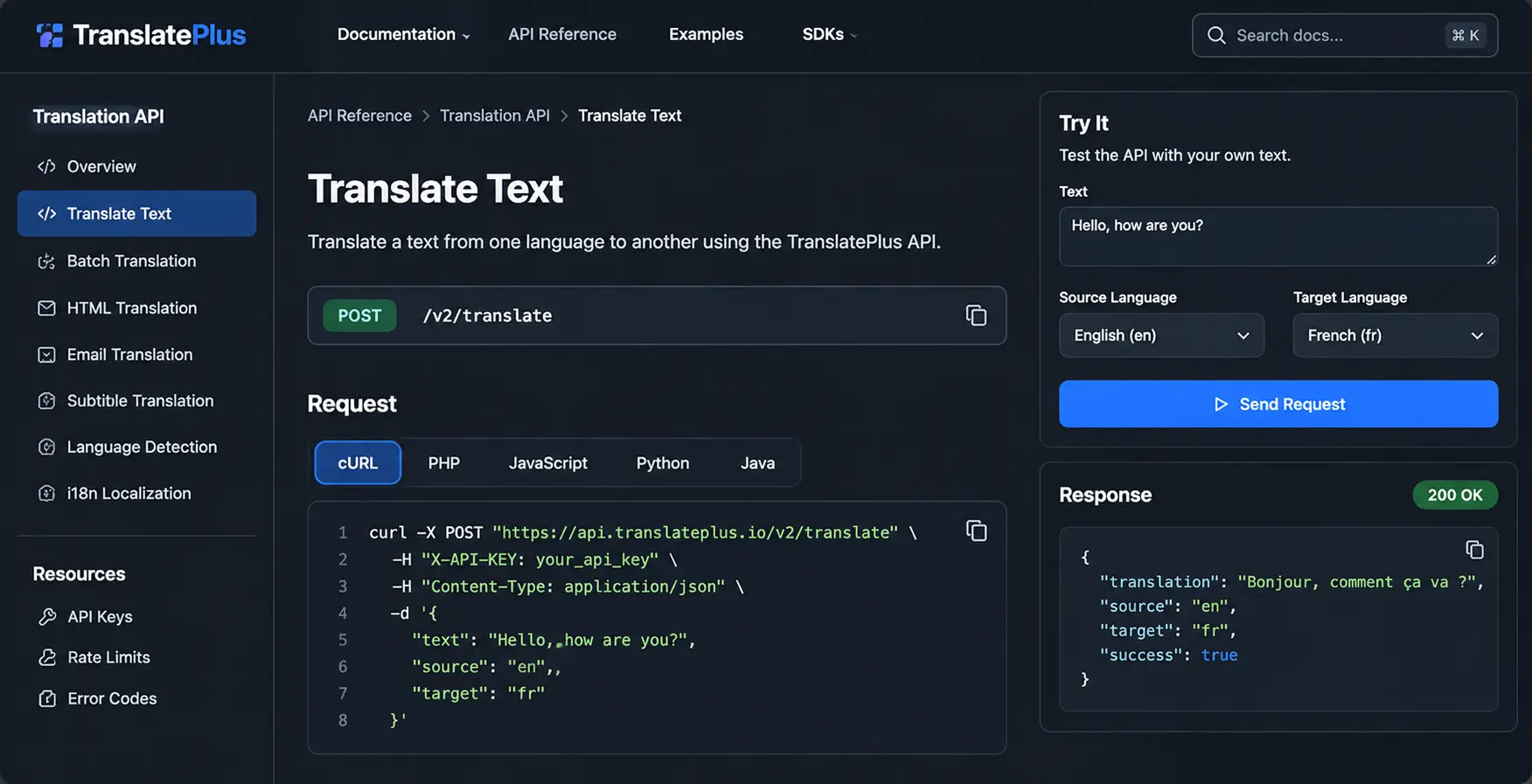
As businesses expand into international markets, the amount of content they need to translate grows rapidly. Ecommerce platforms translate thousands of product descriptions, SaaS companies localize applications, AI platforms process multilingual conversations, and global businesses automate customer communications.
At a small scale, sending individual translation requests might be sufficient. However, when an application processes hundreds of thousands or millions of translation tasks, choosing the right translation API becomes an important infrastructure decision.
A high-volume translation API should offer efficient batch processing, predictable pricing, flexible content handling, clear rate limits, and reliable integration with existing applications.
In this guide, we compare popular translation API providers and explore what developers should consider when choosing a translation solution for large-scale workloads. We also examine how TranslatePlus supports high-volume translation through its REST API, batch processing, HTML translation, email translation, subtitle translation, and automated localization workflows.
What Is a High-Volume Translation API?
A high-volume translation API allows applications to translate large quantities of text automatically through programmatic requests.
Instead of manually translating individual documents or using a website translation tool, developers integrate an API directly into their applications.
Common examples include:
- Ecommerce platforms translating product catalogs into multiple languages.
- SaaS applications localizing dashboards, notifications, and user-generated content.
- Marketplaces translating product descriptions and customer reviews.
- AI applications translating chatbot conversations.
- Video platforms translating subtitles into multiple languages.
- Businesses translating marketing emails and customer communications.
For example, an ecommerce platform with 50,000 products available in five languages needs to manage 250,000 localized product descriptions. A translation API makes it possible to automate these workflows without manually translating every product.
However, the right solution must also support efficient processing, cost management, error handling, and scalable application architecture.
What Makes a Translation API Suitable for High-Volume Applications?
Not every translation API is designed for the same workloads. Before choosing a provider, evaluate the following capabilities.
1. Batch translation
Batch translation is one of the most useful capabilities for applications processing large datasets. Instead of sending a separate HTTP request for every piece of content, developers can submit multiple text items together when the API supports batch processing.
Benefits include:
- Fewer application-level HTTP requests.
- Easier management of translation jobs.
- Simplified background processing.
- Structured translation responses.
- More efficient integration with ecommerce and SaaS applications.
TranslatePlus provides a dedicated batch translation endpoint: POST /v2/translate/batch. The endpoint accepts up to 100 text items in one request. All items in a batch use the same source and target languages.
Each text item consumes one credit, meaning a batch containing 100 texts requires 100 credits rather than one. Developers can review the complete implementation in the TranslatePlus Batch Translation documentation.
2. Predictable API pricing
Translation costs can become significant as an application grows. Different providers use different billing models:
- Character-based pricing.
- Request-based credits.
- Monthly subscription allowances.
- Pay-as-you-go usage.
- Custom enterprise agreements.
Before selecting a provider, understand exactly how usage is calculated. A low advertised price does not necessarily mean a lower total operating cost. Always calculate costs using your actual content and usage patterns. See TranslatePlus pricing for published plan details.
3. Clear rate limits and request quotas
Rate limits determine how frequently an application can send requests to an API. Before choosing a provider, check:
- Maximum requests per second.
- Monthly usage allowances.
- Maximum batch size.
- Maximum content size.
- Concurrent request restrictions.
- Rate-limit behavior.
- Options for increasing quotas.
A high monthly allowance does not automatically mean unlimited concurrent requests. Design applications around the provider's documented limits and request higher capacity when necessary.
4. Multiple translation formats
High-volume translation is not limited to plain text. Modern applications process HTML documents, email templates, JSON files, localization resources, and subtitle files. A unified translation API can simplify these workflows.
| Capability | TranslatePlus endpoint |
|---|---|
| Text translation | /v2/translate |
| Batch translation | /v2/translate/batch |
| HTML translation | /v2/translate/html |
| Email translation | /v2/translate/email |
| Subtitle translation | /v2/translate/subtitles |
For HTML translation, TranslatePlus preserves the HTML tags and document structure while translating text content. Script and style content is skipped. The email endpoint translates the subject and HTML body through a single API operation. The subtitle endpoint supports SRT and VTT files while preserving timestamps and subtitle structure.
5. Automated application localization
Application localization involves more than translating individual sentences. Developers often need to translate structured resource files while preserving keys, placeholders, formatting, and application logic.
TranslatePlus provides i18n localization workflows supporting formats including:
- JSON
- YAML
- PO/POT
- Properties
- Strings
- XML
Its documentation also describes asynchronous job processing, job-status tracking, downloadable results, and webhook notifications. Explore the TranslatePlus API documentation for available localization endpoints and implementation details.
6. Reliable error handling and monitoring
A production translation system should account for:
- Invalid API keys.
- Insufficient credits.
- Unsupported language codes.
- Rate-limit errors.
- Network timeouts.
- Temporary service failures.
- Invalid request parameters.
TranslatePlus uses standardized HTTP error responses, including 400, 402, 403, and 429 responses for documented failure conditions. For temporary failures, use exponential backoff with jitter. Also monitor successful translations, failed operations, remaining credits, request volume, and processing time.
Best Translation APIs for High-Volume Applications
Several established translation providers are worth evaluating for large-scale workloads. The right choice depends on language requirements, infrastructure, pricing, translation quality, and the type of content being processed.
1. Google Cloud Translation API
Google Cloud Translation is an established machine translation service suitable for applications requiring broad language coverage and integration with Google Cloud infrastructure.
- Neural machine translation.
- Extensive language support.
- Cloud infrastructure integration.
- Usage-based pricing.
- Support for different translation workflows.
It can be a suitable choice for companies already operating within Google Cloud. However, developers should review its current quotas, pricing, and applicable service limits before processing large workloads.
2. DeepL API
DeepL is known for its machine translation capabilities, particularly for supported European languages. It is worth evaluating for businesses that prioritize natural-sounding translations and language-specific quality.
- Text translation.
- Document translation.
- Glossary functionality on supported plans.
- API integration.
- Language-specific translation capabilities.
Before selecting it for a large application, review its current language coverage, API limits, and subscription requirements.
3. Microsoft Azure AI Translator
Microsoft Azure AI Translator provides translation capabilities through Microsoft's cloud ecosystem. It can be useful for businesses already using Azure infrastructure and other Microsoft services.
- Text translation.
- Language detection.
- Usage-based pricing.
- Integration with Azure services.
- Enterprise cloud infrastructure.
Organizations should review regional availability, quotas, and pricing before choosing it for production translation workloads.
4. Amazon Translate
Amazon Translate is a machine translation service integrated with Amazon Web Services. It supports real-time and batch translation workflows, making it worth considering for applications built around AWS.
- Real-time translation.
- Batch translation.
- AWS ecosystem integration.
- Usage-based pricing.
- Integration with other AWS services.
Review real-time and batch service limitations separately when planning your architecture.
5. TranslatePlus
TranslatePlus is a developer-focused translation API designed to help applications automate multilingual content processing through a unified REST API. Instead of building separate integrations for different content formats, developers can use dedicated endpoints for text, batch, HTML, email, subtitles, and application localization.
TranslatePlus API capabilities
- Text translation between supported languages through a simple REST endpoint.
- Batch translation of up to 100 text items in one request.
- HTML translation while preserving tags, attributes, and document structure.
- Email translation for subject lines and HTML bodies in one operation.
- Subtitle translation for SRT and VTT while preserving timestamps.
- i18n localization for JSON, YAML, PO/POT, Properties, Strings, and XML.
- Automatic language detection before translation.
TranslatePlus pricing plans
| Plan | Monthly price | Published monthly requests | Maximum characters/request |
|---|---|---|---|
| Free | $0 | 5,000 | 500 |
| Basic | $49 | 250,000 | 1,000 |
| Professional | $99 | 700,000 | 1,500 |
| Mega | $299 | 3,000,000 | 2,000 |
| Enterprise | Custom | Custom | Custom |
The published pricing page also lists plan-specific request-per-second limits:
| Plan | Published requests/second |
|---|---|
| Free | 50 |
| Basic | 1,000 |
| Professional | 1,500 |
| Mega | 3,000 |
These are published plan specifications, not a guarantee that every endpoint or workload can sustain those rates. Check the applicable endpoint limits and account configuration. View the latest details on the TranslatePlus pricing page.
Which TranslatePlus plan should you choose?
- Free — Testing and development. Suitable for evaluating the API and building prototypes.
- Basic — Small applications with relatively modest translation requirements.
- Professional — Growing SaaS products that need higher monthly allowances and priority support.
- Mega — High-volume workloads. Includes three million monthly requests and larger per-request character limits.
- Enterprise — Large-scale applications that exceed published plan allowances or require custom integration and specialized support.
How to Use TranslatePlus Batch Translation
One of the useful features for high-volume developers is the batch translation endpoint. Consider an ecommerce platform that needs to translate product descriptions from English into French. Instead of sending one HTTP request for every product description, developers can group up to 100 texts into a batch.
Example API request
curl https://api.translateplus.io/v2/translate/batch \
  -H "X-API-KEY: your_api_key" \
  -H "Content-Type: application/json" \
  -d '{
    "texts": [
      "Wireless Bluetooth Headphones",
      "Premium Cotton T-Shirt",
      "Stainless Steel Water Bottle"
    ],
    "source": "en",
    "target": "fr"
  }'
Example response
{
  "translations": [
    {
      "text": "Wireless Bluetooth Headphones",
      "translation": "Casque Bluetooth sans fil",
      "source": "en",
      "target": "fr",
      "success": true
    },
    {
      "text": "Premium Cotton T-Shirt",
      "translation": "T-shirt en coton premium",
      "source": "en",
      "target": "fr",
      "success": true
    },
    {
      "text": "Stainless Steel Water Bottle",
      "translation": "Bouteille d'eau en acier inoxydable",
      "source": "en",
      "target": "fr",
      "success": true
    }
  ],
  "total": 3,
  "successful": 3,
  "failed": 0
}
This example contains three text items and consumes three translation credits. For larger datasets, developers can divide their content into batches of up to 100 items and process them using background workers. See the complete Batch Translation API reference.
How to Build a Scalable Translation Architecture
Choosing a translation provider is only one part of a high-volume translation system. Your application architecture also determines how efficiently translation jobs are processed.
Step 1: Create translation jobs
When a user uploads content or updates a product catalog, create translation jobs instead of translating everything synchronously.
Step 2: Store jobs in a queue
Use Redis, RabbitMQ, or a managed message queue to organize pending translation tasks. This separates translation processing from the main application.
Step 3: Divide content into batches
Group compatible texts into batches of up to 100 items when using the TranslatePlus batch endpoint. Keep source and target languages consistent within each batch.
Step 4: Process jobs with controlled concurrency
Background workers send requests to the translation API. Configure worker concurrency according to the actual plan and endpoint-specific rate limits. Avoid sending unlimited simultaneous requests.
Step 5: Store completed translations
Save translated content in your database or object storage. Associate translations with the original content ID, target language, and content version.
Step 6: Handle failed requests
Check individual translation results and retry temporary failures using exponential backoff with jitter. Do not repeatedly retry invalid requests or insufficient-credit errors without correcting the underlying problem.
Step 7: Monitor usage and performance
Track:
- Total API requests.
- Translation credits consumed.
- Successful translations.
- Failed translations.
- Characters processed.
- Average response time.
- p95 response time.
- Monthly subscription usage.
- Remaining credits.
This architecture can help applications manage larger translation workloads while keeping their primary application responsive.
How to Reduce Translation API Costs at Scale
Even with a suitable provider, unnecessary translation operations can increase costs. The following techniques can help reduce consumption.
1. Cache previously translated content
Store completed translations and reuse them when the original text has not changed. A content hash can help determine whether translation is necessary.
2. Translate only updated content
For ecommerce applications, avoid translating the entire catalog whenever one product description changes. Track updated records and process only the modified content.
3. Use batch translation
Group multiple text items into supported batch requests. This can reduce the number of HTTP calls your application needs to make. Remember that batch processing groups requests; it does not eliminate the underlying per-text credit consumption.
4. Avoid duplicate translation jobs
Use unique job identifiers and database constraints to prevent duplicate processing. This is especially important when background workers retry failed operations.
5. Monitor credit consumption
Track actual credit consumption by endpoint. Text, batch, email, and subtitle translation can have different credit requirements.
6. Choose the appropriate subscription
Estimate your monthly workload before selecting a plan. If your application regularly exceeds its available allowance, contact the provider about a suitable higher-volume or enterprise arrangement. Compare options on the pricing page.
Which Translation API Should You Choose?
There is no universal translation API that is best for every application. Your choice should depend on the type of content you process, the languages you need, your existing infrastructure, and your expected usage.
- Google Cloud Translation: Worth evaluating when broad language coverage and Google Cloud integration are priorities.
- DeepL: Worth evaluating when translation quality for its supported languages is especially important.
- Microsoft Azure AI Translator: A suitable option to investigate for applications built around Microsoft Azure.
- Amazon Translate: Worth considering for AWS-based applications requiring real-time or batch translation workflows.
- TranslatePlus: Worth evaluating when you need a developer-focused API with text, batch, HTML, email, subtitle, and i18n localization endpoints under a subscription-based pricing structure.
For high-volume applications, compare actual usage costs, endpoint limits, translation quality, and operational requirements before committing to a provider.
Frequently Asked Questions
What is the best translation API for high-volume applications?
The best provider depends on your language requirements, pricing model, request limits, translation quality, and infrastructure. Google Cloud Translation, DeepL, Microsoft Azure AI Translator, Amazon Translate, and TranslatePlus are all options worth evaluating.
Which TranslatePlus plan is suitable for high-volume applications?
The Mega plan is the highest published standard subscription, at $299 per month with three million monthly requests. Businesses requiring larger allowances, custom integrations, or specialized support can contact TranslatePlus about enterprise arrangements.
Does TranslatePlus support batch translation?
Yes. TranslatePlus provides a dedicated batch endpoint at /v2/translate/batch. It supports up to 100 text items in one HTTP request. Each text item consumes one credit. See the batch translation solution.
Can TranslatePlus translate HTML documents?
Yes. Its HTML translation endpoint preserves HTML tags, attributes, and document structure while translating the text content. Script and style content is skipped.
Can I translate product catalogs using TranslatePlus?
Yes. You can divide product descriptions into batches and process them using background workers. For large catalogs, caching, change detection, and controlled concurrency can help reduce unnecessary usage.
Does TranslatePlus support application localization?
Yes. Its i18n workflows support formats including JSON, YAML, PO/POT, Properties, Strings, and XML. The documentation also describes asynchronous localization jobs and webhook notifications.
How can I estimate my monthly translation costs?
Start by estimating the number of text items you translate, the number of target languages, and the frequency of content updates. Then calculate the expected credit consumption according to the relevant endpoint's billing rules and compare it with the monthly allowance of each plan on the pricing page.
Is TranslatePlus suitable for enterprise workloads?
TranslatePlus offers subscription plans, batch translation, specialized content endpoints, and custom enterprise arrangements. Organizations with large production workloads should validate their expected throughput, endpoint limits, monthly consumption, availability requirements, and support arrangements before deployment.
Final Thoughts
Choosing the best translation API for high-volume applications requires evaluating more than translation quality or the advertised price. You need to understand the pricing model, monthly allowances, batch limits, rate restrictions, supported content formats, and the architecture required to process large translation workloads efficiently.
Google Cloud Translation, DeepL, Microsoft Azure AI Translator, and Amazon Translate each offer different advantages depending on your application and infrastructure.
TranslatePlus provides another option for developers who want text translation, batch processing, HTML and email translation, subtitle processing, and automated application localization through one developer-focused API.
If you are building a SaaS platform, ecommerce marketplace, multilingual application, or automated content processing system, explore TranslatePlus and evaluate its capabilities using your own workload.
Start building with TranslatePlus:
- Explore TranslatePlus pricing
- Read the API documentation
- Explore batch translation
- Create a free account
Test your integration with a representative dataset, monitor actual usage, and choose the plan that matches your application's requirements.